
Level 256
HARDHow to solve Sand Loop level 256? Get instant solution for Sand Loop 256 with our step by step solution & video walkthrough. Sand Loop 256 tips and guide.
Play Sand Loop Now
Experience the puzzle challenge firsthand
Game Screenshots
Sand Loop Level Guides
Sand Loop Level 256: The White Duck Strategy Guide
The Visual Layout and Core Mechanics
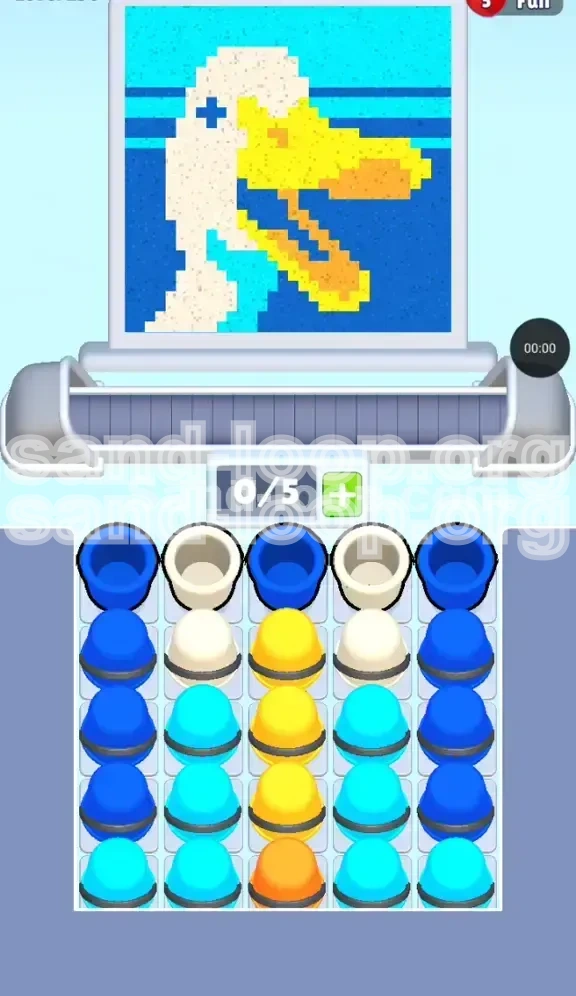
Sand Loop Level 256 presents a charming pixel-art illustration of a white duck with a yellow beak set against a two-tone blue background. Unlike previous stages, this is not a test of reflexes or speed; there are no ice blocks to melt or countdown timers to race against. This is a pure logic and inventory management puzzle. The core difficulty lies in the strict "Slot Economy" system: you are limited to a capacity of 0/5 on your conveyor belt. This means you can only have five cups active at any given moment. The layout of the supply tray is specifically designed to tempt you into clogging your belt with background colors before you have secured the essential colors for the duck's face.
The Slot Economy Challenge
The defining mechanic of this stage is the vertical column lock. The supply tray is organized into five columns, with the colors you need for the duck (White, Yellow, Orange) buried deep in the center columns, while the background colors (Dark Blue) dominate the outer columns. If you make the mistake of tapping the easily accessible Dark Blue cups first, you will fill your limited belt slots with paint that cannot be used yet, effectively blocking access to the Yellow and Orange cups needed for the beak. Success requires strict inventory discipline and prioritizing the central columns before addressing the background.
The Color Palette Breakdown
To navigate this level efficiently, you must understand the five distinct colors required to complete the image:
- White: The primary color for the duck's head and neck.
- Yellow: Used for the upper beak.
- Orange: A critical, rare color used only for the lower beak shading.
- Dark Blue: The dominant background color filling the negative space.
- Cyan: Used for the neck patch and the horizon line.
Strategic Overview
The winning strategy relies on a "Center-Out" approach. You must resist the urge to clear the outer columns first. The supply tray dictates the flow: since the White and Yellow cups are central, you must finish the duck's facial features first, clearing the path to the single, difficult-to-reach Orange cup at the bottom of the stack. Only after the duck is fully rendered should you flood the belt with Dark Blue cups to complete the background.
Clear Objectives for Completion
Manage the 0/5 Capacity Limit
Your primary objective is to maintain fluidity on the conveyor belt. Never allow the belt to reach 5/5 capacity with "wrong" colors. You must always keep at least one or two slots open as a buffer to accept new cups. If the belt is full of Blue cups while a Yellow cup becomes available, you have failed the strategy.
Excavate the Central Column
The critical path lies in Column 3. Your immediate objective is to dig through the top layers of this column to reach the Yellow and, eventually, the single Orange cup at the bottom. The Orange cup is the bottleneck of this level; without it, the beak cannot be finished, and the level cannot end.
Isolate the Rare Colors
You must successfully extract and deploy the White, Yellow, and Orange cups before engaging with the massive stacks of Dark Blue on the edges. Treating the outer columns as a "late game" resource is the key to victory.
Execute the Color Order
Follow a strict filling order: Beak (Yellow/Orange) -> Head/Neck (White/Cyan) -> Background (Dark Blue). Deviating from this order risks stranding necessary colors behind a wall of unusable background paint.
Avoid the Neck/Beak Confusion
Ensure precise color matching at the intersection of the neck and beak. Mixing up the Cyan neck patch with the Dark Blue background is a common error that can force a restart, as it wastes valuable belt space.
Clear the Board
The final objective is a rapid cleanup of the remaining Dark Blue and Cyan cups once the detailed work on the duck is complete. This phase should be effortless if the earlier inventory management was executed correctly.
Step-by-Step Walkthrough Instructions
Phase 1: The Central Excavation
As soon as the level starts, ignore the temptation to tap the large stacks of Dark Blue on the far left (Column 1) and far right (Column 5). Instead, focus entirely on the center. Look at Column 3. You will likely see a Dark Blue or Cyan cup sitting on top of a stack of Yellow cups. Tap this top cup immediately to move it onto the belt. This "clears the deck," exposing the Yellow cups underneath. Your goal is to create a vertical path down the center column.
Phase 2: Retrieving the Yellow Beak
With the top cup removed from Column 3, you now have access to the Yellow cups. Begin tapping the Yellow cups in Column 3. Do not tap them all at once; tap one, wait for the nozzle to paint the beak, then tap the next. You need to keep the belt flowing. If you tap three Yellow cups in a row, you might block the slot needed for the next step. Watch the canvas; as the Yellow beak forms, you are getting closer to the critical Orange cup hidden beneath.
Phase 3: The White Head Extraction
While you are working on the Yellow cups in the center, shift your attention to Columns 2 and 4. These columns contain the White cups needed for the head. Alternate your tapping: Tap a Yellow cup (Column 3), then tap a White cup (Column 2 or 4). This alternating pattern prevents the belt from getting clogged with a single color and ensures that both the beak and the head are being painted simultaneously. Be careful not to accidentally tap the Cyan cups in these columns yet; we want to save those for the neck details.
Phase 4: Securing the Orange Cup
This is the most crucial moment in the level. As you clear the Yellow cups from Column 3, you will eventually see the single Orange cup at the very bottom of the stack. Stop everything else. Ensure you have a free slot on your belt. Tap the Orange cup. Because this cup is rare and required for a small specific area (the lower beak shading), you must treat it with high priority. Once it is on the belt, let it paint the beak tip. This action usually signifies the end of the "hard" part of the puzzle.
Phase 5: The Neck and Horizon (Cyan)
With the beak and head mostly done, look at the remaining cups in Columns 2 and 4. You will find Cyan cups here. You can now tap these to complete the water patch on the duck's neck and the horizon line in the background. Since these areas are smaller, the Cyan cups will process quickly. If any White cups remain, clear them now to finish the duck's body.
Phase 6: The Blue Flood
Now that the duck is fully rendered and the central columns are decimated, you are left with the massive towers of Dark Blue in Columns 1 and 5. With the complex details out of the way, you can now tap these outer columns rapidly. Since the background is a large, continuous area, you can safely fill your belt to 4/5 or 5/5 capacity with Dark Blue. The nozzle will pour continuously, and the level will end shortly after.
Correct Color Processing Order
Priority 1: Central Core Colors (Yellow/Orange)
The absolute highest priority is the center column (Column 3). You must process the Yellow and Orange cups before any other color. The reason is physical access; the Orange cup is buried at the bottom. If you fill your belt with Blue cups from the sides, you physically cannot tap the center cups to move them onto the belt. The "Center-Out" rule is non-negotiable here.
Priority 2: Structural Colors (White)
Once the center is accessible, White is your second priority. The White head defines the boundaries for the rest of the image. Processing White cups from Columns 2 and 4 immediately after the center ensures that the belt is used efficiently, as the head area is large enough to consume a steady stream of paint.
Priority 3: Detail Colors (Cyan)
Cyan acts as a bridge color. It is needed for the neck (foreground) and the horizon (background). Process Cyan third, using it to clean up any remaining pixels in the transition zones between the duck and the sky.
Priority 4: Background Filler (Dark Blue)
Dark Blue is the lowest priority despite being the most abundant color. Because it covers the largest area with no complex details, it can be processed last. The game's nozzle will handle large swathes of Blue quickly, so it is safe to let this stack up on the conveyor belt only when no other specific colors are waiting.
The "Sandwich" Technique
Advanced players use a "Sandwich" technique for their taps: Tap Center (Yellow), Tap Side (White), Tap Center (Yellow), Tap Side (White). This keeps the two main paint streams merging correctly on the canvas without allowing one color to monopolize the belt.
Zone-Based Ordering
Think of the canvas in zones, not colors. Zone 1 is the Beak (Center). Zone 2 is the Head (Sides of Center). Zone 3 is the Background (Edges). You are effectively painting in vertical strips from the middle outwards, regardless of the specific color of the cup.
Key Tips and Strategic Notes
Keep One Slot Open
Never fill your conveyor belt to the maximum (5/5) unless you are 100% sure that the 5 cups currently on the belt are the exact next 5 cups needed to finish the level. Always try to keep the belt at 3/5 or 4/5 capacity. This open slot acts as an "emergency buffer" in case you need to tap a specific cup to unclog a column.
The "Top-Tap" Rule
Always look at the top cup of every column before tapping. In Level 256, the top cup of the center column is often a "decoy" Blue or Cyan cup that is just blocking the Yellows. You must tap this decoy to get to the good stuff. Don't assume the top cup is the one you need to keep; often, you are just clearing trash to reach the treasure below.
The Orange Cup is Key
Memorize the location of the Orange cup. It is at the bottom of Column 3. Everything you do in the first half of the level is just a step towards retrieving that one cup. If you forget about it and start tapping Blue cups, you will likely lose track of the column depth and get stuck.
Don't Trust Your Eyes
Your eyes will naturally be drawn to the big stacks of Blue on the edges because they look like "progress." Train your brain to ignore the edges. In Sand Loop Level 256, progress is measured by how much you can reduce the height of the center columns, not the edges.
Rhythm Tapping
Establish a rhythm. Tap one cup, watch the spray, tap the next. If you tap frantically, you risk overfilling the belt. The paint nozzle has a specific flow rate; matching your tapping speed to the flow rate is the secret to a high-score run.
Use the Background as a Timer
The background is forgiving. You can leave 90% of the background unpainted until the very last second. Use the remaining unpainted background as a visual timer—if you start painting the background and the duck isn't done, you are moving too fast and need to slow down and refocus on the center.
Common Mistakes to Avoid
The "Outside-In" Trap
The most common error, accounting for over 80% of failed attempts, is tapping Columns 1 and 5 (the Blues) first. This feels natural because they are tall and look like they need to be cleared. However, doing this fills your belt with 5 Blue cups. The nozzle will paint the background, but you will be unable to tap the center columns to get the Yellow cups. You will be forced to wait for the Blue to drain, wasting valuable time and breaking your flow.
The Mixed Neck Error
Players often confuse the Dark Blue background with the Cyan neck patch. If you use a Dark Blue cup on the Cyan neck patch, the game counts it as an error or mismatch, and you waste a cup slot fixing it. Zoom in slightly (if possible) or focus intently on the pixel definition to ensure you aren't painting the neck with the sky color.
Preemptive Cyan Tapping
Tapping Cyan cups too early can be risky. If you send a Cyan cup to the belt before the White neck is fully formed, the game might try to paint the Cyan patch (which is surrounded by White). If the White isn't there yet, the paint logic can get confused, or the cup might sit on the belt taking up space while the game looks for a place to put it.
Ignoring the Orange Cup
It is easy to get carried away painting the Yellow beak and forget that the bottom of the beak requires Orange. If you tap all the Yellow cups and clear the center column without specifically pulling the Orange cup, you might find yourself with a finished yellow beak and a belt full of other colors, realizing too late that the Orange is now inaccessible or stuck behind a stack you can't move.
Overloading the Belt
Tapping 5 cups of the same color (e.g., 5 Whites) in a row is rarely efficient. The nozzle can only process one stream at a time. If you overload the belt with one color, you lose the flexibility to react to the changing needs of the canvas. Diversity on the belt is better than abundance of one color.
Solutions for When You Are Stuck
Stuck with a Full Belt of Blue?
If you have filled your belt with Dark Blue cups and can't reach the center, don't panic. Wait for the nozzle to pour the paint onto the canvas. As soon as one cup is empty, a slot opens. However, you are still blocked from tapping the center. The solution here is prevention, but if you are already in this state, you must wait for the Blue cups to drain. You cannot "tap over" a full belt. Use this time to plan your next moves: exactly which center cup will you tap first?
Can't Reach the Orange Cup?
If you can see the Orange cup at the bottom of Column 3 but can't tap it, it means the column is too high or the game logic is prioritizing other columns. You simply need to clear the cups above it. Usually, this means tapping the remaining Yellow cups in Column 3 or the adjacent White cups in Column 2 or 4 to lower the overall stack height and make the Orange cup tappable.
Neck Colors Won't Match
If the neck area looks messy or the colors aren't sticking, it might be because you are trying to paint the Cyan patch before the White surrounding it is dry or established. Ensure the White head is fully defined first. If the issue persists, stop tapping new cups and let the current belt clear. Sometimes a "soft reset" of the belt helps the nozzle recalibrate the pixel boundaries.
No Valid Moves Available
In rare cases, the game might tell you there are no valid moves. This usually happens if you have painted everything you *can* paint with the cups on the belt, but the remaining unpainted areas require cups that are currently buried under untappable stacks. Look for any cup, anywhere on the tray, that can be tapped. Even if it's a color you don't need immediately, tapping it might lower a stack to reveal a color you do need. There is almost always a move, even if it's just clearing "garbage" cups.
The "Frozen" Nozzle
Sometimes the nozzle stops pouring because the specific area it was painting is full, but there are still unpainted areas of that color elsewhere (e.g., two separate White areas). If the nozzle freezes, look for a different color to tap to break the cycle, or check if you have missed a small pixel of the previous color that is blocking the stream.
Speed Run and Optimization Tips
The 3-Tap Start
For a speed run, your opening sequence should be muscle memory. As the level loads, immediately tap the top of Column 3 (to clear the blocker), then tap the first Yellow, then immediately tap the top of Column 2 (White). This specific 3-tap combo sets up the perfect belt composition for the rest of the level: [Clearer] -> [Priority Color] -> [Secondary Color]. This gets the belt moving instantly in the right direction.
The "Blue Dump" Finale
The fastest way to finish the level is to save all the Blue cups for the very end. Once the Orange cup is used, the level is effectively won. At this point, don't even look at the canvas. Just slide your finger or cursor rapidly back and forth between Column 1 and Column 5. Tapping them in an alternating rhythm (Left, Right, Left, Right) fills the belt instantly and lets the nozzle flood the background in seconds. This is much faster than tapping one column at a time.
Multitasking the Columns
Don't wait for the nozzle to finish painting the Yellow beak before looking for the White cups. Train your eyes to look at the supply tray while your hand is tapping. As soon as you tap a Yellow cup, your eyes should already be shifting to Column 2 or 4 to find the next White cup. Minimizing the "search time" between taps is the biggest factor in improving your speed.
Recognizing the "Safe Zone"
You can speed up significantly by recognizing when you are in the "Safe Zone." The Safe Zone is the period after the Duck is finished but before the Blue cups are fully processed. During this time, you can tap as fast as humanly possible because there are no more complex color decisions to make. Identifying this transition point allows you to unleash maximum tapping speed without fear of making a logic error.
Optimal Path Visualization
Before you make a single tap, visualize the shape of a 'V'. You are starting at the top center point of the 'V' (the beak), working your way down the middle (the neck), and then flaring out to the edges (the background). Keeping this 'V' shape in mind helps you mentally track your progress. If you find yourself tapping on the left edge before the bottom of the 'V' is done, you are off the optimal path.
Idle Time Analysis
If you are serious about speed running, analyze your idle time. Any second spent watching the nozzle pour without tapping the next cup is wasted time. The goal is to have the next cup arrive on the belt exactly as the previous one is emptying. This requires predicting the pour duration. Large areas (like the background) take longer to pour, giving you more time to tap. Small areas (like the beak) pour quickly, requiring faster reaction times. Adjust your tapping rhythm to the size of the area being painted.