
Level 233
HARDHow to solve Sand Loop level 233? Get instant solution for Sand Loop 233 with our step by step solution & video walkthrough. Sand Loop 233 tips and guide.
Play Sand Loop Now
Experience the puzzle challenge firsthand
Game Screenshots
Sand Loop Level Guides
Level Overview: The Apple-Head Cat Challenge
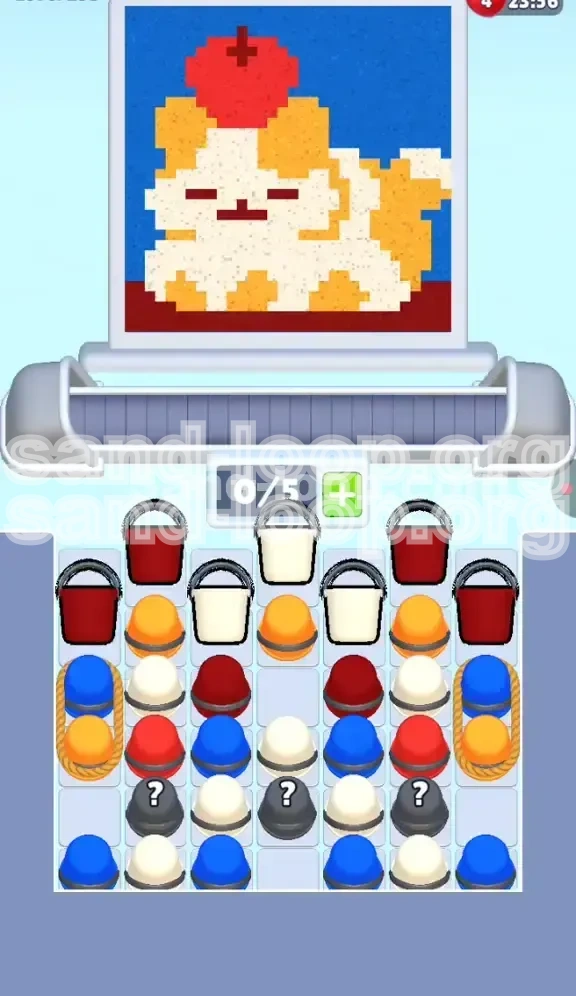
Welcome to the definitive walkthrough for Sand Loop Level 233. This stage presents a delightful pixel-art depiction of a Calico Cat (often mistaken for a floppy-eared dog) struggling to balance a massive red apple on its head. While the artwork appears charming, the gameplay mechanics beneath are deceptively complex.
This level is classified as a Supply Stack Logic puzzle. Unlike time-attack stages, your primary enemy here is congestion. The supply tray is a chaotic mess of colors, and you must dig through specific layers to unlock the necessary components for the background and finer details. The visual noise of the orange and white fur can easily distract you from the critical path hidden beneath.
Visual Analysis of the Canvas
Before you tap a single bucket, take ten seconds to analyze the three distinct zones of the artwork. Understanding the pixel distribution is the key to managing your limited conveyor slots (5 total). The canvas is split into the Red Zone (Apple), the Chaos Zone (Cat), and the Hidden Details.
The Role of the Mystery Buckets
The gray Mystery Buckets marked with a question mark (?) are not random; they are scripted containers. They hold the specific pigments required for the cat's eyes, nose, and the apple stem. You cannot find Black or Dark Gray sand anywhere else in the initial tray.
The "Dependency Lock" Mechanic
Pay close attention to the far left and right edges of the supply tray. You will notice Roped Columns wrapping around Blue and Orange buckets. These act as dependency locks. You cannot access the side stacks until you have cleared the central debris, forcing a specific play order.
Understanding Color Distribution
The color palette is heavily skewed. Approximately 40% of the canvas is Orange/White, 30% is Red, 20% is Blue, and 10% consists of the rare Black/Gray details. Do not prioritize the minority colors early, or you will block your conveyor belt.
Difficulty Assessment
Level 233 has a difficulty rating of 4/5 stars not because of speed, but because of "Slot Management." One mistake—such as loading three Orange buckets when the scanner needs White—can cause a gridlock that takes 10-15 seconds to clear, potentially failing the level.
Clear Objectives: Your Path to Victory
To achieve a three-star rating and complete the level efficiently, you must adhere to a strict sequence of operations. Your goal is not just to fill the canvas, but to maintain a smooth flow of sand from the tray to the conveyor.
Objective 1: Clear the Top Layer (The Apple)
Your immediate priority is the Red Zone. The giant apple sits at the top of the canvas and is the most accessible element. Clearing this first serves a dual purpose: it completes a large visual section and, more importantly, bores a hole through the center of the supply tray to access the deeper layers.
Objective 2: Manage the "Chaos Zone" (The Cat)
This is the hardest phase. You must alternate rapidly between White and Orange sand to match the patchy fur of the cat. Your goal here is to keep the conveyor moving without stalling, all while avoiding the temptation to clear the side columns.
Objective 3: Unlock the Mystery Components
You must survive until the scanner reaches the facial features of the cat. Only then should you breach the Mystery Buckets. Releasing the black sand too early will clog your slots when you urgently need white or orange.
Objective 4: Execute the Blue Flood
The background is the final hurdle. You must resist the urge to tap Blue buckets when they first become visible on the sides. The correct strategy is to ignore them until the main artwork is fully rendered, then unleash a massive flood of Blue sand to finish the level.
Objective 5: Maintain Slot Hygiene
Throughout the level, keep at least 2 slots open at all times. Never fill your 5-slot conveyor with a single color unless you are 100% certain the next 20 pixels require that color. Blocking your slots is the fastest way to lose.
Step-by-Step Walkthrough: Detailed Instructions
Follow this precise action plan to navigate the supply tray effectively. Do not deviate from the order of operations unless the specific color supply is exhausted.
Phase 1: The Red Apple Rush (Start - 15%)
The moment the level starts, the top row of the supply tray will reveal 2-3 Red buckets. Ignore all other colors.
- Action: Immediately tap the available Red buckets at the top of the center stack.
- Strategy: Load a maximum of 3 Red buckets into your conveyor slots.
- Timing: Allow these to pour while the scanner is over the apple area.
- Warning: Do not touch the White or Orange buckets yet. You need the "hole" created by the Red buckets to fall deeper into the stack.
Phase 2: The Orange/White Alternation (15% - 60%)
Once the Reds are cleared, you will expose a messy mix of Orange and White buckets. This is the "Chaos Zone." Watch the scanner line on the canvas like a hawk.
- Scanner Watch: If the scanner is moving over a white patch of fur, only tap White buckets. Do not load Orange.
- Micro-Tapping: Tap one bucket, wait for it to load, then check the scanner again. Do not "spam tap" multiple colors at once.
- Slot Management: Keep 2 slots empty. If you load 3 Orange and the scanner hits a white spot, you are stuck waiting for the Orange to pour.
- The Center Path: Focus only on the center columns of the tray. Ignore the roped sides for now.
Phase 3: The Mystery Reveal (60% - 80%)
As you dig through the center, you will eventually expose the gray Mystery Buckets (?) buried at the bottom center of the tray.
- Identification: These buckets contain the Black/Dark Gray sand needed for eyes and the apple stem.
- The Trigger: Wait until the scanner is just about to hit the cat's face or the top of the apple.
- Action: Tap the Mystery Buckets only when the conveyor is relatively empty.
- Result: This releases the rare color exactly when the canvas needs it, preventing the black sand from occupying a slot during the fur-painting phase.
Phase 4: The Blue Flood (80% - 100%)
By now, the cat and apple should be fully colored. You will notice the remaining supply tray is mostly Blue buckets, including those trapped in the Roped Columns.
- Final Push: Now you can ignore the scanner line.
- Spam Tapping: Tap every remaining Blue bucket in the tray, including the side columns.
- Fill Slots: Since the artwork is done, you can fill all 5 conveyor slots with Blue. The background is the largest area, so it will consume all this sand rapidly.
- Victory: Watch the sky fill up to complete the level.
Key Tips & Notes for Mastery
To truly master Level 233, you need to understand the underlying logic of the game's spawning algorithm. These tips will help you avoid the common pitfalls that plague inexperienced players.
The "Scanner First" Rule
The most important rule in this level is: Look at the canvas, not the tray. The supply tray is static; it will wait for you. The scanner moves constantly. Always match your bucket selection to the immediate needs of the scanner line. If the scanner is on Orange, the tray full of White buckets is useless to you until you switch.
Mystery Bucket Mechanics
Mystery Buckets in Sand Loop are often programmed to act as "Save Points" for rare colors. They are rarely random. In Level 233, the game knows you need Black/Dark Gray, but hides it to force you to clear the clutter first. Treat them as a reward for good play, not a random gamble.
The "Do Not Disturb" Zones
The Roped Columns on the left and right are tantalizing, especially when you see Blue buckets early. However, physics dictates that the stack above them must fall before you can access them. Trying to clear the sides prematurely is a waste of valuable slot space and mental energy. Trust the process: core the center first.
Slot Economy Analysis
Your 5 conveyor slots are your most valuable resource. Think of them as currency. Spending 3 slots on Orange when you need White is "bad debt." Keeping 2 slots open is "saving for a rainy day." It allows you to adapt instantly when the scanner switches from a patch of white fur to an orange patch.
Color Transition Speed
When switching between colors (e.g., from Orange to White), there is a slight animation delay as the new bucket loads into the chute. This is why loading 3 of the wrong color is fatal. By the time the wrong color pours, and the new color loads, the scanner may have moved past the target zone, forcing a wait for the scanner to loop back.
Common Mistakes to Avoid
Level 233 is designed to punish impatience. Most failed attempts are due to one of three critical errors. Learn to recognize them before they happen.
Mistake 1: The "Color Blind" Rush
Many players tap every bucket they see regardless of color. In the early "Red" phase, this is fine. But in the middle "Chaos" phase, tapping White while the scanner is on Orange creates a bottleneck. The conveyor fills with White sand, waiting for a White patch that is 20 pixels away, while the scanner passes over the Orange pixels you currently have loaded.
Mistake 2: Premature Side Clearing
You might see a Blue bucket on the edge and think, "I should grab that now to get it out of the way." Don't. If you pull a side Blue bucket early, it sits in your conveyor taking up space. Since the background (Blue) is the last thing you paint, that Blue bucket is just dead weight blocking you from grabbing the White or Orange you desperately need right now.
Mistake 3: Ignoring the Stem and Eyes
It is easy to focus on the big blocks of color (Red, Orange, White) and forget the details. If you clear the main fur but haven't prepared access to the Mystery Buckets, the scanner will stall on the eyes. You will find yourself with a full canvas of fur and apple, but a stuck scanner because you have no Black sand ready.
Mistake 4: Overloading the Conveyor
Filling all 5 slots feels productive, but it limits your flexibility. If you have 5 slots full of Red, and the apple is finished, you have to wait for 5 buckets to empty (or manually dispose of them) before you can switch to Orange. Always keep 1 or 2 slots open for rapid color switching.
Mistake 5: Panic Tapping on Gridlock
When the conveyor stops because you have the wrong color, the instinct is to tap wildly. This usually makes it worse. Instead, pause, identify the color you should have, and wait for the current blockage to clear. Patience is faster than panic.
Speed Run Tips & Stuck Solutions
For players looking to optimize their time or those who find themselves stuck at 80% completion, this section provides advanced tactics to shave seconds off your clock.
Speed Run: The "Pre-Load" Technique
If you have memorized the canvas pattern, you can "Pre-Load" the next color while the current one is pouring. For example, if you know the scanner will hit a White patch immediately after the current Red patch, you can tap the White bucket while the Red is still pouring. It will queue up instantly, minimizing downtime.
Stuck Solution: The "Slot Dump"
If you are completely stuck—meaning you have loaded the wrong color and the scanner is far away from that color zone—use the "Slot Dump" maneuver. Drag the incorrect bucket out of the conveyor slot and back into the supply tray (or discard zone if available). This is faster than waiting for it to pour and fail.
Shortcut: Ignoring the Background
While not a standard tactic, some speed runners choose to ignore 90% of the Blue background until the very last second. Since the Blue buckets are at the bottom/sides, they are inaccessible anyway. Focus 100% of your attention on the Red Apple and the Cat Fur. Once those are perfect, the level is effectively "won," and the Blue background is just a formality.
Recovery: Dealing with Mystery Bucket Failures
Sometimes, you might tap a Mystery Bucket too early, and Black sand sits in your slot. If the scanner is nowhere near the eyes, drag that Black sand out of the slot immediately. Do not let it occupy space. You can pick it up again later when the scanner is actually positioned over the facial features.
Optimizing the "Roped" Release
The Roped Columns on the sides usually drop automatically once the central mass is low enough. However, sometimes they need a "nudge." If the central stack is gone but the sides haven't fallen, try tapping the top-most bucket of the side stack. Sometimes this physics interaction triggers the collapse, releasing the Blue flood you need earlier.