
Level 278
EXPERTHow to solve Sand Loop level 278? Get instant solution for Sand Loop 278 with our step by step solution & video walkthrough. Sand Loop 278 tips and guide.
Play Sand Loop Now
Experience the puzzle challenge firsthand
Game Screenshots
Sand Loop Level Guides
Level 278 Overview: The Aquarium Bottleneck
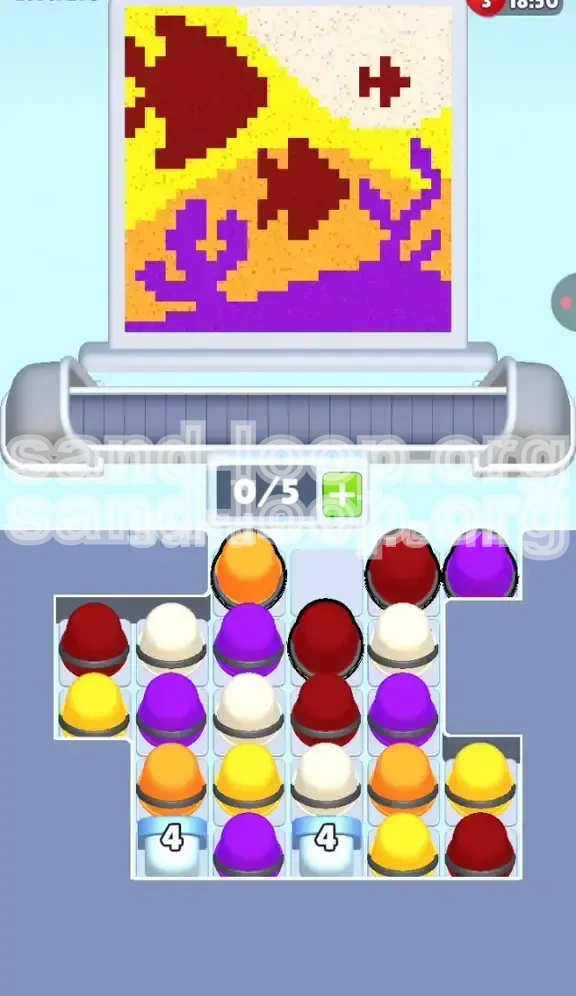
Welcome to the deep end of the pool. Level 278 of Sand Loop is not just a test of your pouring accuracy; it is a rigorous examination of resource management under pressure. While the visuals depict a serene scene of two red fish swimming among purple coral, the gameplay reality is a frantic race against a suffocatingly small inventory limit.
This level is defined by one critical mechanic: the 5-slot capacity. In most levels, you have the luxury of pulling cups onto the conveyor belt to sort them or "save for later." Here, that luxury is removed. The conveyor belt acts more like a short-term processing chute than a storage inventory. If you pull five cups that cannot be poured immediately, the game locks up, and you fail. Furthermore, the board is segmented by "Ice Buckets" at the bottom of Columns 2 and 4, which function as hard barriers. You cannot access the colors in the lower half of these columns until you clear the three cups sitting directly on top of them. This creates a "tunneling" dynamic where you must chip away at specific vertical stacks while simultaneously managing the diagonal painting requirements of the background.
The Dual Challenge: Diagonals and Ice
The unique difficulty in Level 278 comes from the collision of two mechanics: diagonal painting zones and vertical supply blocking. The fish and coral are painted in distinct diagonal bands. This means the "target zone" for your sand is constantly shifting left-to-right as the picture fills up. You cannot simply focus on the left side of the screen and move right linearly. You must jump from the bottom-left (Orange) to the center (Maroon) to the top-right (Cream) unpredictably. Combining this erratic targeting with the need to dig out specific columns to unlock Ice Buckets creates a high-stakes puzzle where every tap must be calculated.
The Inventory Crisis
With a maximum capacity of only 5 cups on the belt, your margin for error is roughly 20%. You can only afford to have one cup in transit at any given moment. This statistic dictates your entire strategy. You cannot pull a cup to "look at it" or "save it." You must only tap a cup when you have an immediate, active need for that color on the canvas. The moment you pull a cup that you don't need right now, you have wasted 20% of your total capacity. If you make this mistake three times, your belt is full, and you are stuck watching the timer run out while the correct colors remain buried in the tray.
Visual Recognition: Identifying the Zones
Before you tap a single cup, take five seconds to memorize the color map. The canvas is divided into five distinct color zones.
- Deep Maroon (Fish): The central focal point. Two large, solid bodies.
- Bright Purple (Coral): The bottom anchor. Intricate, branching structures.
- Orange (Sand/Bottom-Left): The foundation layer.
- Yellow (Mid-Diagonal): A diagonal stripe cutting from top-left to center-right.
- Cream/White (Top-Right): The highlight zone, smallest in area but critical for contrast.
Why "Convenience" is a Trap
The game tempts you with easy choices. You will see a Maroon cup at the top of Column 1, which is easy to access. However, the Maroon cup you actually *need* to clear might be at the top of Column 4, sitting directly above a blocked Ice Bucket. If you take the easy cup from Column 1, you leave the Column 4 cup blocking your progress. You must learn to ignore convenient colors and prioritize inconvenient ones if they unblock your supply line. This is the "Tunneling" mindset required to beat Level 278.
Supply Chain Analysis
The "4" Ice Buckets are not just obstacles; they are your secondary supply depots. Once cleared, they usually release a cascade of much-needed background colors (often Yellow or White). However, they are locked behind a 3-cup shield. The supply chain math is simple: 3 cups to clear + 1 cup to trigger = 4 actions required to unlock the bonus. You need to plan these 4 actions in advance, ensuring you have enough open belt space to handle the influx of new cups once the Ice breaks.
Step-by-Step Walkthrough: From Start to Finish
This walkthrough divides the level into three distinct phases: The Opening (Clearing the Top), The Mid-Game (Tunneling and Diagonals), and The End-Game (Ice Breaking and Polish). Follow these steps in order to maintain flow and prevent belt jams.
Phase 1: The "Fish and Coral" Opening
The first 10 seconds of Level 278 are the most critical. Do not touch the background colors (Yellow, White, Orange) yet. Your sole focus is on the foreground elements: the Maroon Fish and the Purple Coral.
Action 1: Scan the top row of the tray. Identify the Maroon cups. There will likely be one in Column 1 or 3.
Action 2: Tap the Maroon cup. Pour it immediately into the body of the first fish. Keep pouring until the fish is 60% full. Do not try to finish it perfectly; just get the bulk of the color down.
Action 3: Locate a Purple cup. Tap it. Pour it into the Coral structures at the bottom left.
Action 4: Alternate between Maroon and Purple. Why? Because these two colors occupy opposite ends of the canvas (Center vs. Bottom). Alternating them prevents the nozzle from having to travel across the screen repeatedly, saving precious milliseconds.
The Golden Rule of Phase 1: If your belt reaches 4/5 cups, STOP TAPPING. Pour what you have. Wait until a cup empties and disappears before tapping the next one in the tray.
Phase 2: The "Diagonal Shift" Strategy
Once the fish and coral are roughly 70% complete, the top layer of the tray will be cleared. You will now see the second layer of cups, which are likely Yellow and Orange. This is where the level gets chaotic.
The Challenge: The Yellow zone is a diagonal stripe running from Top-Left to Center-Right. The Orange zone is Bottom-Left. The Cream zone is Top-Right.
Step 1: Look at your active cups. Do you have Yellow? If yes, move the nozzle to the Top-Left of the yellow stripe. Start pouring and follow the diagonal line down towards the center.
Step 2: If you have Orange, move to the Bottom-Left. Pour the base layer.
Step 3: Critical Timing: If you have Cream (White), do not pour it yet if the nozzle is currently in the bottom-left (Orange zone). Moving the nozzle from Bottom-Left to Top-Right takes a long time. During this travel time, your belt is not moving. Only pull the Cream cup when you have a clear path and enough open slots to handle the travel delay.
Step 4: Watch the "fill percentage." If the fish is at 90%, stop prioritizing it. Even if a Maroon cup appears, ignore it if you have a 40% complete Yellow zone that needs attention. Prioritize the zones that are furthest behind to balance the picture.
Phase 3: The "Ice Breaker" Protocol
By now, you have likely cleared the top two layers of cups in all columns. You are now staring at the "4" Ice Buckets in Columns 2 and 4. You have one cup sitting on top of each bucket.
The Decision: Which column to clear first?
Analysis: Look at the color of the cup sitting on the Ice Bucket in Column 2. Now look at the color on the Ice Bucket in Column 4.
- If the cup on Column 2 is a color you need (e.g., Yellow for the background), clear Column 2 first.
- If the cup on Column 4 is a color you need (e.g., Cream to finish the top corner), clear Column 4 first.
The Execution: Tap the cup blocking the Ice Bucket. Pour it. The bucket will drop down one level or crack. Repeat until the bucket is destroyed. Warning: When an Ice Bucket breaks, it often releases 2 cups at once. If your belt is at 3/5 capacity, do not break the Ice Bucket yet. It will jam your belt. Wait until you are at 1/5 or 2/5 capacity, then break the bucket to safely absorb the new cups.
Phase 4: The Final Polish and Clean Up
The Ice Buckets are gone. The tray is almost empty. You are likely sitting at 85-90% completion. The remaining work is fixing the "edges" and "corners" that were missed during the bulk filling.
Target 1: The Top-Right Corner. This Cream/White zone is the hardest to hit because it's far from the start. Use any remaining White cups to hit this corner specifically.
Target 2: The Gaps in the Diagonal. Look closely at the Yellow stripe. There are likely Orange pixels bleeding into it, or gaps where the sand missed. Use precision tapping to fill these micro-gaps.
Target 3: The Fish Eyes. Sometimes the Maroon fish need a tiny bit more detail to trigger the "Complete" state.
Strategy: At this stage, speed matters less than accuracy. Do not rush. If you have one cup left on the belt and one in the tray, take your time to aim. A single misplaced pour can cost you the percentage needed to pass.
Managing the "Leftover" Cups
Sometimes, you will end up with a single cup of a color you don't need (e.g., a Purple cup when the Coral is 100% done).
Solution: You cannot delete it. You must pour it somewhere "safe." Pour it into an area that is already 100% filled with that color. It won't change the picture, but it will empty the cup, allowing you to pull the next one from the tray. Never pour a "useless" color into a "wrong" color zone just to get rid of it. This will force you to use a *correct* color later to fix the mistake, wasting two cups instead of one.
The Color Processing Order: A Mathematical Approach
To minimize nozzle movement and maximize efficiency, you must adhere to a specific processing order based on the canvas layout. The canvas in Level 278 is roughly divided into three horizontal bands, but painted diagonally. To handle this, we group the colors into "Priority Tiers."
Tier 1: The Anchors (Maroon and Purple)
Colors: Deep Maroon (Fish), Bright Purple (Coral).
Reasoning: These colors occupy the largest contiguous blocks. They are the easiest to hit because the target area is large. Furthermore, they act as visual anchors.
Order: Alternate them. Maroon -> Purple -> Maroon.
Why: If you finish all Maroon first, and the tray stops giving you Maroon, but you still have 30% of Purple to do, you are stuck waiting for Purple. By alternating, you keep the supply chain balanced and ensure you always have work to do for both colors.
Tier 2: The Bridge (Yellow)
Color: Yellow.
Reasoning: The Yellow zone cuts diagonally across the center of the screen. It touches the Maroon fish and the Purple coral. It is the "bridge" between the foreground and the background.
Timing: Process Yellow only after Tier 1 is at least 50% complete.
The Risk: If you process Yellow too early, you might pour it into the Orange zone (Bottom-Left) or the White zone (Top-Right) by mistake. Wait until the Maroon Fish provides a clear visual boundary in the center, then you can trace the Yellow stripe accurately.
Tier 3: The Boundaries (Orange and Cream)
Colors: Orange, Cream/White.
Reasoning: These are the "edge" colors. Orange fills the bottom-left. Cream fills the top-right.
Constraint: These colors are the most dangerous because they are at the extremes of the nozzle's movement.
Strategy: Process Orange immediately after a Purple cup (since they are both on the left/bottom). Process Cream immediately after a Yellow cup (since Yellow leads towards the top-right). This minimizes the travel distance of the nozzle. Never pour Cream immediately after Orange. That forces the nozzle to traverse the entire screen diagonally, wasting valuable seconds.
The "Banana" Strategy (Visualizing the Curve)
Imagine the path of your nozzle as a banana shape.
Step 1: Start in the Center (Maroon).
Step 2: Curve down to Bottom-Left (Purple -> Orange).
Step 3: Curve up through the Middle (Yellow).
Step 4: End at Top-Right (Cream).
This flow minimizes the start-stop motion of the machine. If you jump randomly between Cream and Purple, the machine spends more time traveling than pouring. Stick to the curve!
Adapting to Tray RNG (Random Number Generation)
The guide above is the ideal. However, the tray is random. What if you only have Orange cups available?
Rule of Deviation: If the tray forces you to break the order (e.g., gives you Cream when you need Orange), do not pull the Cream cup yet. Instead, focus on pouring what you already have on the belt to clear space. If you absolutely must pull a cup out of order, do it, but try to group it with a neighboring color. For example, if you pull Cream (Top-Right) but you are currently at the Bottom-Left, pour a little bit of it into the top-right, then immediately switch back to pouring your main color (Maroon/Purple) in the center to "reset" your position for the next cup.
Key Tips and Strategic Advice
Mastering Level 278 requires more than just knowing the order; it requires managing the game's physics and UI quirks. These tips are designed to give you an edge in the split-second decisions that define the run.
Tip #1: The "Pre-Pour" Wait
When you tap a cup, it takes a moment for the machine to grab it and another moment for the nozzle to align. During this time, do not tap another cup. Watch the first cup. If you tap a second cup while the first is being grabbed, you risk jamming the belt if the first cup encounters a "full" zone and stops pouring immediately. Always wait until you see sand flowing (or the cup confirming "Empty") before tapping the next one.
Tip #2: The 80% Rule for Blocking Cups
Remember the Ice Buckets in Columns 2 and 4? Don't try to clear them until you have filled the main fish and coral to about 80%. Why? Because clearing the Ice Buckets releases a flood of background colors (Yellow/White). If you clear the Ice Buckets too early, your belt will be flooded with background colors, but your canvas won't be ready for them yet. You will be forced to either pour them into the wrong spots (ruining the picture) or hold them on the belt (jamming the capacity). Clear the Ice Buckets only when the canvas is hungry for those final background touches.
Tip #3: Micro-Movements for Diagonals
The diagonal Yellow stripe is narrow. If you just hold the cup down, the sand will pile up in one spot and might bleed into the surrounding colors. Instead, use "micro-movements." As the sand pours, slowly drag your finger/mouse along the path of the stripe. This ensures the sand distributes evenly along the thin diagonal line, filling it faster and preventing overflow into the Orange or White zones.
Tip #4: Managing the "Last 5%"
The hardest part of Level 278 is the last 5% of the picture. The game becomes stingy with the exact colors you need, and you often have one pixel of Orange left, but the tray only gives you Purple.
The Solution: Do not fixate on the last pixel. If you are stuck at 98% completion, look for the *largest* unfinished area, even if it's the "wrong" color priority. Pouring a large amount of Purple to finish a 10% gap is better than hunting for a specific Orange cup to fix a 2% pixel gap. Finishing the large blocks often triggers the game's algorithm to spawn the specific missing color you need for the tiny gaps.
Tip #5: Visualizing the "Ghost" Layers
The game allows you to see the "ghost" of the picture (the outline) before you fill it. Use this! Before the level starts, trace the diagonal Yellow stripe with your eyes. Identify exactly where the Coral ends and the Sand begins. If you have this mental map ready before the clock starts, you won't hesitate when the cups start flying down the belt. Hesitation is the enemy of speed.
Common Mistakes to Avoid
Players fail Level 278 for predictable reasons. By understanding these common failure points, you can self-correct during the run.
Mistake #1: The "Column 1" Addiction
Column 1 is the easiest to tap. It requires no thought. Many players fall into a rhythm of just tapping the top-left cup repeatedly because it's comfortable.
The Consequence: You drain Column 1 while Columns 2, 3, 4, and 5 remain untouched. This leaves the Ice Buckets in Columns 2 and 4 completely buried. By the time you realize you need to clear the Ice Buckets, you have no moves left because your belt is full of useless Column 1 cups. Fix: Force yourself to tap Column 4 early, even if it feels awkward.
Mistake #2: The "Belt Full" Panic
When the belt hits 4/5 or 5/5, panic sets in. Players start tapping random cups on the canvas, trying to pour *anything* to free up space.
The Consequence: You pour Red sand onto a Yellow zone. Now you have a contaminated Yellow zone. To fix it, you need to pour Yellow sand over the Red spill. This wastes two cups to fix one mistake. Fix: If the belt is full, stop. Look at the canvas. Find the color you have the most of on the belt. Pour *that* color into its correct zone, even if it's not the zone you *want* to be working on. Clear the belt logically, not randomly.
Mistake #3: Ignoring the "Diagonal" Geometry
Many players treat the canvas like a grid (Top-Left, Bottom-Left, etc.). They pour Yellow in the top-left because "Yellow is a bright color, so it goes on top."
The Consequence: The Yellow zone is actually a diagonal bridge. If you pour Yellow in the top-left corner (where it doesn't belong), you block the area meant for Cream/White. Now you have nowhere to put the White cups later. Fix: Trust the outline. If the outline is diagonal, pour diagonally. Do not assume horizontal or vertical placement based on other levels.
Mistake #4: Breaking Ice at the Wrong Time
You see the Ice Bucket is one hit away from breaking. You get excited and tap it immediately.
The Consequence: The bucket breaks and drops 3 cups onto the belt. You already had 3 cups on the belt. Total: 6 cups. The game jams. Game Over. Fix: Always count your belt capacity before breaking an Ice Bucket. The formula is: (Current Belt Count) + (Expected Ice Drop) must be less than or equal to 5.
Stuck Solutions and Troubleshooting
Sometimes, despite your best efforts, the RNG (Random Number Generation) deals you a bad hand. Here is what to do when the level seems impossible.
Problem: "I have no moves, the belt is full, and the tray has nothing I need."
Situation: Your belt is full of Maroon and Purple. The canvas is 100% full of Maroon and Purple. The tray is offering only Yellow and White. You can't pull the Yellow/White because the belt is full.
Solution: You have a "Deadlock." You must sacrifice. Take a cup from the belt (Maroon) and pour it onto a *finished* Maroon area. This is a "waste" pour. It doesn't help the picture, but it empties the cup. Once the cup is gone, you have space to pull the Yellow cup from the tray. Waste pouring is a valid strategy to break a deadlock.
Problem: "The Ice Bucket is blocking the only color I need."
Situation: You need White to finish the top-right. The only White cup is under an Ice Bucket in Column 4. The Ice Bucket is blocked by two Purple cups.
Solution: You must eat the cost. You have to pull and pour the two Purple cups, even if you don't need them. Pour them into finished Purple areas (waste pour). This clears the path to the Ice Bucket. Once the Ice Bucket is broken, you get the White cup. It costs 2 wasted cups to get 1 needed cup. It's inefficient, but it's the only way to progress.
Problem: "I keep running out of time."
Situation: You are playing perfectly, but the timer hits 0:00 just as you reach 90%.
Solution: Your "Nozzle Travel Time" is too high. You are spending too much time moving the nozzle across the screen. Optimization: Group your pours. Do all the Bottom-Left work (Purple/Orange) in one batch. Do all the Top-Right work (Cream/Yellow) in one batch. Minimize the switching. Also, try to predict the next color. If you have a Yellow cup pouring, and you know you need Maroon next, start moving the nozzle towards the center (Maroon zone) *before* the Yellow cup is fully empty.
Speed Run Tips and Shortcuts
For players looking to achieve 3-star status or top the leaderboards, these advanced techniques will shave seconds off your time.
Shortcut #1: The "Double Tap" Trigger
When you tap a cup, there is a slight animation delay before the sand starts flowing. You can minimize this by tapping the cup *exactly* as the previous cup leaves the belt or as the nozzle arrives at the zone. This is called "queueing." If you tap the next cup while the nozzle is still traveling to the current zone, the game will buffer the input. As soon as the current cup finishes, the next one grabs immediately. This prevents the "idle" gap between pours.
Shortcut #2: Pre-Breaking Ice
If you have a split second where the belt is empty (1/5 or 0/5), and you know the Ice Bucket is close to breaking, break it early. Don't wait until you are desperate for the color. If you break it while the belt is empty, the new cups drop onto a clean belt, giving you maximum flexibility to sort them immediately. Breaking Ice while the belt is empty is always faster than breaking it when the belt is half-full.
Shortcut #3: Ignoring Small Details
Perfectionism kills speedruns. Do not fill the picture to 100% pixel-perfect accuracy in the first pass. Aim for 90% coverage. Leave the small corners and intricate edges of the Coral empty. It is much faster to sweep back at the very end with a single cup of Purple to hit all the small gaps than it is to try and hit every single gap perfectly as you go. Do the "bulk fill" first, the "detail fill" last.
Shortcut #4: The "Swipe" Technique
Instead of tapping individual cups, try swiping your finger across the top of the tray if the cups are arranged in a usable order (e.g., Maroon, Purple, Yellow). The game accepts swipe inputs. This is faster than individual taps. However, this is high-risk. If the order is wrong (e.g., Maroon, Yellow, Purple), swiping will pull the Yellow cup too early and jam your belt. Only use the swipe technique if you have verified the order in the tray matches your current needs.